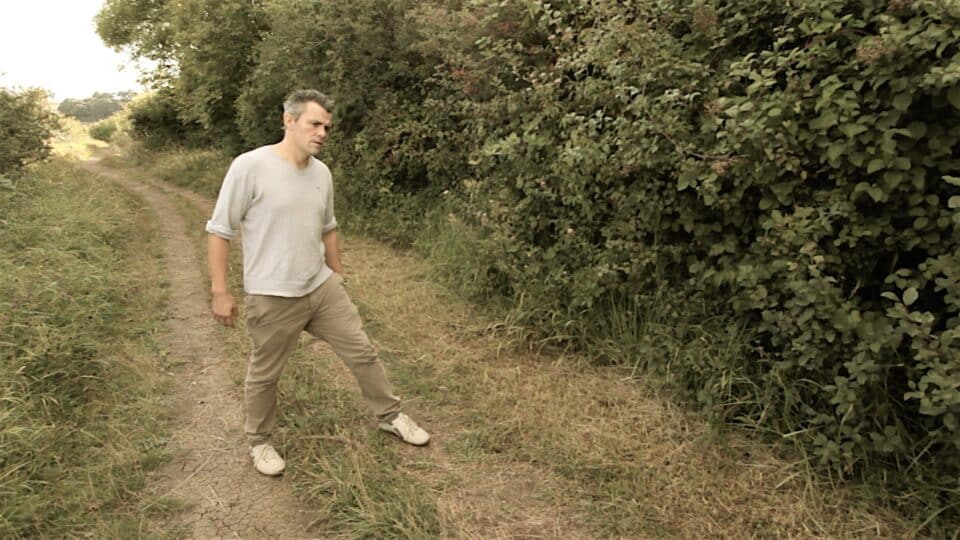
How to control the depth of field so your subject stands out sharply.
If you're like most videographers, you want to make
your shots look as good as possible. Managing which areas of your shots
are in and out of focus can be one of the most valuable tools in your
arsenal. And controlling the depth of field ultimately determines your
focus area. By understanding how your camcorder's lens operates, and
with a little practice, you will be on your way to more interesting and
creative shots.
What is Depth of Field?
Depth of field is the area of an image that appears in focus. Camera
settings, the amount of light and your equipment's technical
specifications are all factors that can impact depth of field, making it
deep or shallow.
First, it is important to understand that whenever a lens is
involved, there is only one plane of exact focus. There is, though, an
area of acceptable focus in front of and behind this plane. In a shallow
depth of field, only the subject and a small area in front of and
behind it will be in sharp focus. A deep depth of field results in
objects farther away from the focus plane lying within acceptable focus
range
Controlling the depth of field allows you to make your subject stand out
sharply from the background, or to put as much of the shot as possible
in focus. For example, when shooting your son playing violin in the
midst of the string section, you may want him to stand out from the rest
of the orchestra. On the other hand, you might want the entire
orchestra to be in focus, which may not be a trivial task in low-light
situations. Most consumer-level camcorders have very deep depths of
field in most shooting situations.
What Affects Depth of Field?
While there are many ways to alter your camcorder's depth of field,
there are really only two variables that determine depth of field: focal
length and aperture. Focal length is a function of your camcorder's
lens and is changed when you zoom in or out on a subject. You can,
therefore, easily change the depth of field of your shot by simply
zooming. The aperture, on the other hand, is a bit more complicated to
control, but is easy to understand. The aperture or iris simply controls
how much light gets into your camcorder. You can manually control
aperture settings, but the shutter speed and the amount of light in a
scene will always be an influence on these settings as well.
Focal Length
Let's begin by examining focal length. The focal length of your lens
directly affects depth of field. When shooting a wide angle shot, the
focal length of the lens is relatively short and will have a deeper
depth of field. If you zoom in, the focal length gets longer, and the
shot will have a more shallow depth of field
If you want your subject to stand out in a crowded scene, you could use a
long focal length lens, thereby decreasing the depth of field and
making your subject the only area of focus. A lens with a short focal
length is typically called "wide-angle" and a long focal-length lens is
known as a "telephoto." In other words, when you are zoomed in, your
lens has a longer focal length and therefore has a more shallow depth of
field.
Subject distance from the lens and from the background also plays a part in depth of field
For example, decrease the distance between the camera and your subject
and more of your shot will be in focus. To have only your subject in
focus, increase the distance between your subject and the background,
allowing the background to fall out of the depth of field.
Aperture (Iris)
The aperture setting determines the size of the opening (iris) that
lets light through to the CCD. A small aperture setting results in a
deeper depth of field and a large aperture setting provides a shallow
depth of field. Say, for example, that you're shooting a panoramic scene
and want as much in focus as possible. You would use a smaller aperture
to maximize the depth of field. If you want your subject to stand out
from the background by being the only thing in focus, you would choose a
larger aperture to decrease the depth of field. Keep in mind, a smaller
aperture setting allows less light through, so you may have to make
other adjustments to compensate, such as adding lights or slowing the
shutter speed.

The amount of available light is one of the most important
factors in determining the proper aperture setting, which then affects
the depth of field. If the subject area is dimly lit, you'll need to use
a wide aperture setting which will cause a shallow depth of field. If
the subject area is brightly lit, you can set the aperture to a smaller
opening, resulting in a deeper depth of field.
For outdoor shooting, you can create a more shallow depth of
field by moving into the shade, which will allow you to use a larger
aperture setting. Conversely, you can increase the depth of field by
moving into the sunlight, which will require a smaller aperture setting.
Indoors, controlling the amount of light can also help you control the
depth of field. Adding additional light will allow for a smaller
aperture setting, resulting in a deeper depth of field; lowering the
light level allows for a larger aperture setting to give you a more
shallow depth of field.

Shutter speed also affects how much light gets into the camera,
which determines how wide you can open your aperture and therefore plays
a part in depth of field. A high shutter speed lets less light through.
Because less light gets through, you will need to open the aperture
setting, which results in a more shallow depth of field. A slow shutter
speed allows more light through. With more light, you can use a smaller
aperture setting, which results in a deeper depth of field
Controlling Depth of Field
The camera and lighting variables already mentioned interact to
control the depth of field. To retain proper exposure levels, you may
need to make an adjustment to more than one setting at a time. For
example, when using a larger aperture setting, you may have to increase
the shutter speed to compensate for the additional light passing through
the lens.
To utilize depth of field as a creative tool, get to know the
different settings on your equipment. Find your camcorder's exposure or
iris control and learn how to use it. Try using a higher or lower
shutter speed setting to see what effect these have on the depth of
field. In cameras with automatic exposure control (or ones with the
ability to lock the exposure), adjust the shutter speed first and then
set the exposure. Jot down the settings you use so you can recreate the
effect later.

Remember that subject distance, combined with zooming, also
plays a part in depth of field. Sometimes simply moving the subject, the
camera or both while zooming in or out will give you the depth of field
desired. Try various distances and zooms and note the results.